Presidential Innovation Fellows

Project MyUSA: Welcome to Round 2!

Hello! I know it’s been a while, but seeing as how we just kicked off the second round of the Presidential Innovation Fellowship, I thought I’d take the opportunity to post a quick update on Project MyUSA. Things have been going quite well, and we’ve got some amazing stuff in the works over the next few months.

First, let’s address the name change. We are now Project MyUSA! From the earliest days of the project, we discussed what the ideal name for the project should be, but we wanted to focus our energy on coming up with great ideas, and so we put it aside. Towards the very end of the first round of Project MyGov, we revisited the subject and, after much consideration, decided to rechristen the project as MyUSA. We think MyUSA more effectively captures what we’re trying to accomplish and how we’d like to present ourselves to the public. We hope you like it!

Let’s recap where things are; in the first round, we (Phil, Ben, Danny, Kara and I) were given a challenge: how could we make a citizen’s experience when interacting with government better? To answer that question, we took a hard look at the current state of things, identified what we felt were the key issues, and set about to come up with solutions.

The problems we identified were:

  • It’s hard to navigate government to find the information, tools and services relevant to your needs;
  • Interacting with the government is done through multiple channels with no consistent user experience, and no way to control or manage how government access your information;
  • Engaging the government to do something for you, typically by filling out and submitting a form, is still an antiquated and cumbersome process.

The solutions we built to help solve them were:

  • MyUSA Discovery: a toolbar that can be added to any government website to help connect visitors to resources across federal, state and local government websites, so they can quickly find what they are looking for;
  • MyUSA Account and MyUSA API: a single account that citizens can use to sign into any government website, giving them control of how government interacts with them and their information. The MyUSA API captures common ways in which government interacts with citizens and makes those available as web services for agencies to use in building citizen-centric web applications.
  • MyUSA Forms: a tool to enable agencies to create and publish forms online, and make every form an API.

The solutions we built, which are all open source on Github, were essentially prototypes; the next step is to take those prototypes, get them production-ready, and start testing them in the real world. Which brings us to today.

We’ve just brought on a new group of outstanding fellows, and our main goal is to take those solutions and scale them out so that America can begin to use them. Once the tools are in production, we can begin to collect feedback and improve what we’re offering based on what makes sense for users.

To do that, we’ve put together two teams, all part of the greater MyUSA initiative. The core MyUSA team will be focused on improving and scaling out the existing solutions, while the BusinessUSA team will be focused on building a killer example of what kinds of applications and interactions are possible with MyUSA’s tools and services.

We’ll post more in the coming days and weeks with details of what we’re rolling out. In the meantime, let’s introduce the team.

First off, I’m very happy that I was asked to lead Project MyUSA after my fellowship ended in January. This project is very near and dear to my heart and I’m determined to see it succeed.

Our new fellows are:

  • John Felleman (BusinessUSA)
  • Justin Grevich (MyUSA)
  • Hillary Hartley (MyUSA)
  • Claire Holroyd (BusinessUSA)
  • John Kemp (MyUSA)
  • Alison Rowland (BusinessUSA)
  • Amos Stone (BusinessUSA)
  • Raphael Villas (MyUSA)

More information about the fellows (scroll down to MyUSA)

In addition, we’re very happy to have the support of the USA.gov team at GSA and BusinessUSA at the SBA. We’ll be working very closely with them over the coming months to benefit from their skills and experience.

And with that, let Round 2 of Project MyUSA begin! Please be in touch if you have any thoughts, ideas or questions, and keep your eye out for more regular updates soon!

Twitter @ProjectMyUSA
Facebook Project MyUSA
Posted in Announcements | Tagged MyUSA, Discovery, Account, API, Forms, Round 2

Open Source *All* The Things

Open Source *ALL* the things.

When we first set out to reimagine the relationship between government and the people, our goal was not simply to build the next generation of citizen-facing tools and services, but to also fundamentally change how these tools are built. We started by looking closely at at our own process and quickly committed to architechting an open platform from day one.

Today, MyGov would not be possible if it were not for countless open source projects, from our own internal tools to the very servers that power MyGov itself. For those unfamiliar with the term, open source software is simply software for which the underlying, human-readable instructions are made publicly available for others to use, re-use, and submit improvements. Think about it as analagous to the “give a penny take a penny” tray at your local convenience store, or asking a neighbor if you can borrow a screwdriver.

Why open source rocks

Open source offers government many advantages. For one, it provides opportunties for cross-agency collaboration that avoids duplication of efforts — after all, many of the challenges faced are common across government. Shared solutions like MyGov allows agencies to concentrate on tackling mission, as opposed to trying to solve the same problem time and time again. Likewise, without having to reinvent the wheel each time, agencies can bring services to market faster, cheaper, and often with better quality. Last, open source forces developers not to bake in bespoke solutions or couple interfaces too closely to underlying logic. This allows for better modularity and fungability over the lifetime of the code, meaning individuals systems can more easily communicate with one another and the initial investment can last longer and be more easily upgraded over time.

It’s about the community, people

At its core however, open source is about community, not technology. Today we’d like to take a moment to give back — to put a penny back in the tray — and more importantly, to add to the ongoing dialog around improving the digital delivery of government services. Both with our colleagues at other government agencies, and with the public more broadly. As with all open source software, feel free to adapt the code for your own projects, but with this code especially, we encourage you to take a moment to improve it by submitting a pull request.

MyGov

Behind the scenes

Jump right in

MyGov began its journey by setting out to improve the way citizens interact with government, but to continue, we need your help. The code is just the start. It is our hope that these MyGov projects can serve as one example of a greater joint effort — citizens and government collaborating to improve our shared experience. After all, unlike many other sites on the web, it’s your code. You paid for it. If you’re a coder or a designer or even just an involed citizen, we encourage you to take a critical look at MyGov, and get involved on our developer page.

Farewell

This is our final post as Team MyGov. It’s been a great 6 months, and we appreciate all your help, support, and feedback along the way as we worked on our project. There’s more to come from MyGov in the future, but for now: so long, and thanks for all the fish.

Regards, Phil Ashlock, Ben Balter, Danny Chapman, Kara DeFrias & Greg Gershman Presidential Innovation Fellows v1

Posted in Announcements | Tagged Open Source, Developers, Community, Code

Introducing the MyGov Discovery API: Come Build Something Cool

Last week we announced the MyGov Discovery Bar. This week we’d like to dive a bit deeper by taking a look at the API that powers it, with the hope that developers within the open-government community can help make it better.

Thy Discovery API exposes all the information that’s normally available via the MyGov Discovery Bar (code) in an open, machine-readable format. In fact, the Discovery Bar itself consumes the API — we eat our own dog food. Why would we do this? Two reasons: first, exposing an API to collect and retrieve information at the outset and then going back to build the layer to display it forces us to separate data from presentation and allows the application to be more flexible.

The Discovery Bar may be how the information is used today, but that doesn’t mean it’s always going to be that way and we encourage members of the community to build apps using it. Second, by using the API to power the Discovery Bar, we can see the data from the perspective of an outside developer and can hopefully, in the end, produce a better, more useful API.

Using the API

So what can the Discovery API do? Currently, the federal .gov footprint is organized around how government is structured. If a citizen wants to complete a given task, they have to know what agency to go to, and often times, what office within that agency. The Discovery API layers a folksonomy on top of the entire .gov landscape, allowing developers to query pages by keyword, or more importantly, to find content related to a given page.

Think about it this way: if you decide to change your name (perhaps you’re getting married), you’re probably going to want a new passport. But if we knew that task was also closely related to getting a new social security card or driver’s license, at least we could point you in the right direction. But that’s not the only way the Discovery API can be used. What if you want a listing of the top government content by tag, or a timely subject? Just query the Discovery API by tag.

Under the Hood

The Discovery API breaks the .gov space into pages, each represented by a uniqiue URL. Pages can have tags which in turn provide related pages. Each page is organized by domain (the part before the .gov in the URL), and domains can be queried by reverse domain name (e.g., gov.whitehouse.). This way, if you want all the subdomains of a given agency, you can get that list in a machine readable format.

The Discovery API launched with some core seed data, namely each federal executive .gov, and those pages available within one click of the home page, but over time, as people use the API, it can grow to become a comprehensive index of the most popular government pages.

Interested in giving it a try? Kick the tires in our API Sandbox or take a look at the code powering it.

Posted in Announcements | Tagged Open Source, Developers, Community, Code, API

Introducing the MyGov Discovery Bar

This is the first in a series of posts introducing each of the products we’ve been working on as part of Project MyGov.

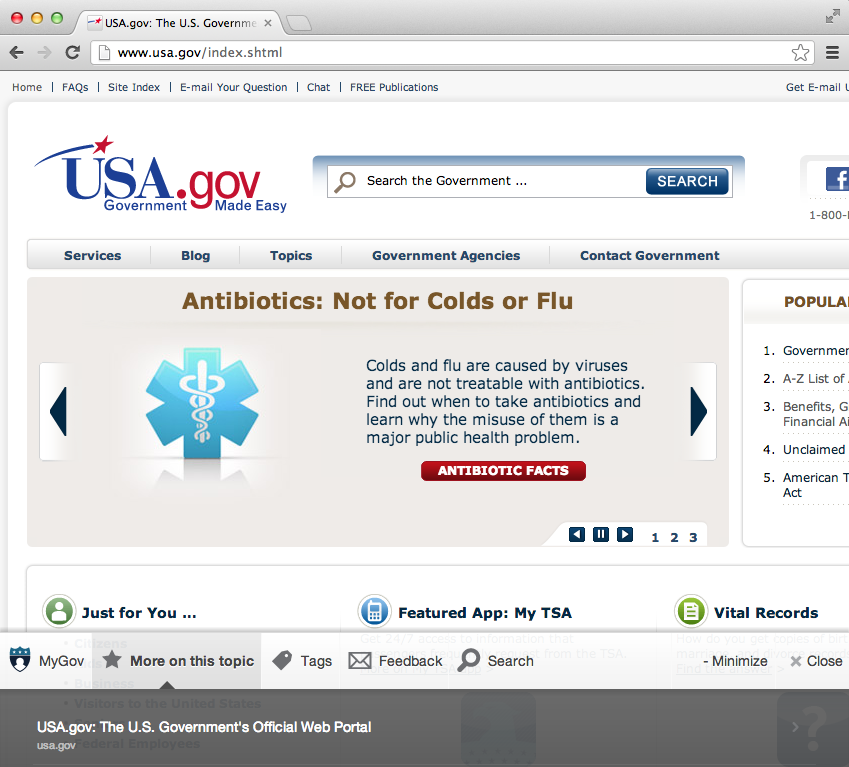
MyGov Discovery Bar shown seamlessly integrating on USA.gov

MyGov Discovery Bar shown seamlessly integrating on USA.gov

The government web is two things: big, and distributed. (Did we mention big?) The General Services Administration (GSA) runs USA.gov, a central site that provides a top-level view into the government web. That works well if you’re on USA.gov, but what if you’re on some other part of the government web? Shouldn’t you be able to see other resources, programs, benefits, services, forms, etc. from across the federal government if they are relevant to what you’re trying to accomplish?

Here at Project MyGov, we think the answer to that question is: “Yes.”

So we built the MyGov Discovery Bar, which acts as a persistent tool to help you navigate the government web. When looking at a government web page, the Discovery Bar uses its knowledge of what the page is about to recommend other related pages. Just like when Amazon says, “People who bought this item, also bought this one,” we recommend other pages across the government web footprint (regardless of what site or agency they live on) to you, when you need it most.

To do this, we’ve built the Discovery Bar to unobtrusively slide into view as you reach the end of a page. (We figure if you’re that far down the page, you’re ready for more information.) We’ve tried to make it easy for you to control the experience, so if you feel like the bar is in the way, you can minimize or close it completely.

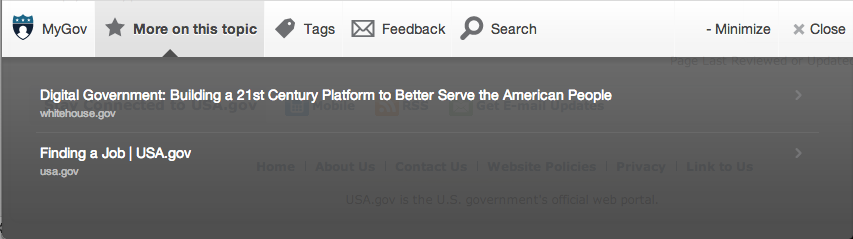
We also want to help improve your overall experience when visiting government websites. If you expand the bar, a few options present themselves. You can view tags associated with the page you’re looking at. You can even add or edit tags to help make our service better. You can provide feedback to the government on the page you’re viewing, and help us figure out which are the most helpful of our pages. And if you’re just not finding what you’re looking for, you can do a search across all the government web sites.

All right Mr. DeMille, I'm ready for my close-up.

All right Mr. DeMille, I'm ready for my close-up.

We’re working with agencies to get the Discovery Bar set up as a standard across the federal web; state and local governments are welcome to participate as well. In the meantime, we’re doing testing as part of our private beta, and will update here when the bar is more generally available. You can sign up for the beta.

We’re pretty excited about the Discovery Bar, and think it’s a great step toward making the federal web even more user-centric.

Keep an eye for for Part II of the series: Introducing your MyGov Account.

Posted in Announcements | Tagged Bar, Discovery, Screenshots

Building MyGov as an Open Platform: Part 1

In an earlier post we provided an overview of the the different MyGov components that form a complete suite of personalized services. Now we’d like to share some perspective on the technical architecture we’ve been developing and show you how we see MyGov acting as an open platform that existing government websites (as well as outside applications) can hook into. Providing an open platform allows agencies to incorporate MyGov features in their own ways and allows us to leverage the ingenuity of civic hackers and the broader innovation of the American people.

Before diving into the technical architecture or looking at any one single component, it’s worth reviewing a few core principles that govern our approach. This will be part one of a two part post and part two will detail technical architecture piece by piece. At a fundamental level our approach has been open, open, open, open. We’re creating an open platform with a foundation built on open architecture, open source, open data, and open standards.

Open Architecture

A small-pieces-loosely-joined service-oriented architecture allows us to build many modular components separately. These components can interconnect when they need to but can also be autonomous and fully functional on their own. Not only does this give us more flexibility, it also encourages government to build internal tools the same way we would expect outside parties who want to integrate with the platform. This kind of dog-fooding and open architecture way of doing things has driven the success of many ventures from Amazon, to Twitter, to GNU/Linux, to the web itself. In fact, there may even be some parallels between the recent Digital Strategy guidelines for exposing APIs and similar enterprise-wide policies that have transformed the companies that thrive as open SOA platforms.

Open Source

There’s no reason to build everything from scratch, so we’ve been building on existing open source stacks and components wherever possible including Ruby on Rails and a common LAMP architecture on the backend as well as Foundation, JQuery, and Backbone on the frontend. Likewise, we’ve been sharing our code and we invite pull requests, bug reports, and feature requests. The value and potential of civic software is multiplied when it’s truly treated as a public good. As the original description of the project states, MyGov will be “developed not just for the people, but also by the people.” We also recognize the potential for other governments both local and international to reuse components of the MyGov platform.

Open Data

One of the most critical tenets of MyGov has been to give people more complete access and control of their own private data and this introduces an important new dimension to the traditional discourse on open data.

Arguably, we’ve been focusing on transactions and personal information more than the kinds of content where typical open data practices are applicable, but by giving people more control of their own data we’re enabling open data on an individual basis where privacy matters. In some ways, the data crunching behind MyGov is what many are starting to call “small data” which is meant to convey personalization and contextual relevance in contrast to more abstract analytics often associated with the trendy world of “big data.” There are secure authenticated APIs that allow you to share your data within the platform, but we’ve also been creating and leveraging traditional open data resources to surface contextual and personally relevant content. For example, with the context provided by a city or zipcode people can start to be more connected to their local services and representatives.

Public facing open data efforts have also been expanding more broadly across the government. In fact, MyGov’s Chief Open Data Hacker, Ben Balter, has been a critical contributor to Project Open Data and some general purpose open data tools like DataBeam have already been developed to help support some of the MyGov infrastructure.

Open Standards

No open platform can truly sustain or scale an ecosystem without a healthy relationship with open standards and MyGov is no different. Open standards help facilitate modular interchangeable parts and they encourage the development of compatible components by third parties including federal agencies, local government, and independent developers. From the beginning we looked at existing initiatives such as the federal government’s standardization effort around identity or Open311 for a custom forms API and have worked to integrate or otherwise align them with the platform. At its core MyGov will standardize the process and refine the control people have around transacting with government. In some ways this will be more of a standardization of process and user experience in terms of how people authorize government agencies and third party applications to access their information, but it also leverages technology standards like OAuth. You may be familiar with this process if you’ve ever connected a separate application to your Twitter or Facebook account. Over time, a set of standardized APIs for government interactions will lay the foundation for a whole new ecosystem of applications that can innovate government just like the iPhone App Store or the marketplace of Android apps has radically transformed the way we use our phones.

Open for Feedback

We’ve been trying to follow these principles (and many others) as best as we can while navigating the challenges of innovating within government, but we know we can always do better. Please let us know if you have any questions or feedback on our approach and please stay tuned for part two which will examine the suite of MyGov components piece by piece in more technical detail.

Posted in | Tagged

We believe: the Project MyGov principles

In cleaning up our shared drive and docs, I came across the “We Believe” principles we created back on August 2nd during an early ideation session. Among other things, we talked about what we wanted to accomplish with the project. By getting aligned our first week here in DC, it helped us lay the blueprint for how to deliver on the Project MyGov charter:

To reimagine how citizens interact with government through an experience designed around their needs rather than a confusing and fragmented bureaucracy.

In re-reading them, we agreed it’s inspiring how many we stuck to.

##We believe…

###About the project

  1. Change the culture. Don’t just build a product — disrupt bureaucracies and challenge assumptions.
  2. Be responsive. Solve for actual needs and problems, not perceived ones.
  3. Serve the people first, and the government second. We’re here to serve the American public as a whole (and even foreign visitors), so they should always be our primary focus. We can also strive to make it easier for agencies to fulfill that mission.
  4. Create simplicity. Reduce cognitive burden. Absorb the complexity on behalf of the public to give them a delightful experience.
  5. Be smart. Informed decisions over superfluous options.
  6. Be personalized. Reach people where they are with contextually relevant experiences.
  7. Be sexy. Go beyond intuitive functional designs to deliver an aesthetically beautiful experience. Design for the ideal, not the lowest common denominator. Create loyal and passionate users, not passive ones.
  8. Be an open platform. Build for the future. Be lean, modular, and decentralized. Expose APIs. Encourage reuse and collaboration through interoperability. Eat our own dog food.
  9. Embrace unpredictability. Evolve with the experiment. Respond and pivot as needed.
  10. Share. Keep the public informed, and actively seek out feedback.

###About our creative process

  1. Be badass. Apply can-do jujitsu (instead of being risk averse) when challenging unchecked assumptions within institutional culture.
  2. Treat every interaction as an opportunity to delight. From pixels to copy, code to community, each part of the process should be a positive experience to engage and defy expectations.
  3. Design with emotion. Actively engage users with a voice, tone and personality that fits the context of the interaction, and heightens and improves the experience.
  4. Always ask: Are we solving for the right thing?
  5. Mobile first. Bake responsive web design into the DNA - it’s not an afterthought, but core to the experience.
  6. Be lean and agile: Use prototypes and experiments to validate learning and make data-informed decisions. Ship unfinished code and be prepared to fail fast.
  7. Embrace ignorance. Run with our naiveté on government constraints as well as the public’s lack of familiarity with the bureaucracy.
  8. Don’t unnecessarily handicap the creative process. Say “Yes, and” instead of “no, but.”
  9. Meaningful deadlines are not arbitrary. Milestones should have a purpose.
  10. No HIPPOs (highest paid person’s opinion). Titles and hierarchy don’t impact weight of ideas.
  11. Meetings are the exception, not the rule. Have a clear understanding of who the meeting is with, who they are, the purpose of the meeting, and the intended outcomes.

Regards,

The MyGov Presidential Innovation Fellows

Posted in | Tagged

A Layman's Guide to MyGov

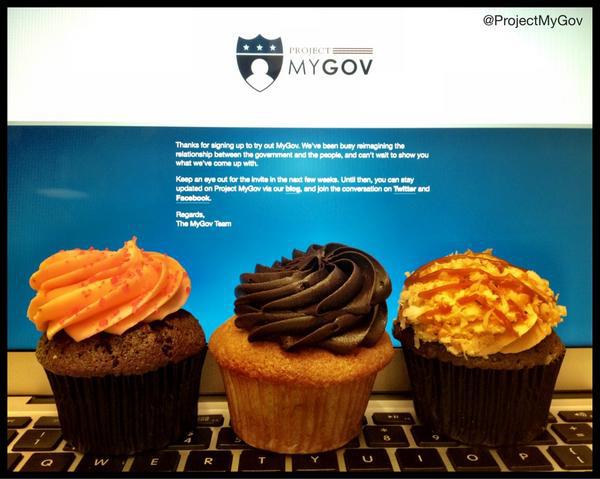
cupcakes

Cupcakes for everyone at the launch of MyGov beta.

November is often a time for giving thanks, eating inordinate amounts of turkey, watching football, and joining millions of people early one Friday morning to buy the same things you could get online from the comfort of your home. We’re not judging on that last one, but as a tech-focused team we’re simply reminding you that most websites offer free shipping.

For Project MyGov, we’re thankful that a mere 16 weeks after we met each other in Washington, DC, to begin our time as Presidential Innovation Fellows, we launched our first working prototype of the MyGov beta – and nearly 600 folks signed up to kick the tires.

If you’re late to the game, here’s a quick primer on the project.

###MyGov - The Cliffs Notes version###

  1. Tasked with reimagining the relationship between the government and the people from a technology standpoint.
  2. Creating a platform to standardize how agencies interact with the people, focused around the public’s needs, as opposed to the goverment’s fragmented beauracracy. (We’re defragging government, so to speak.)
  3. Working on sample apps for simplifying common tasks like changing your name, applying for grants, and finding benefits.
  4. Creating a service to bring government forms online.
  5. Launched working prototype the week of Thanksgiving. Taking iterative approach: invite folks in, make changes based on feedback received (using IdeaScale and other channels), invite more people in. Rinse, repeat. To participate, [sign up today] (https://my.usa.gov).

That’s all for now. Hope you’ve got lots to be thankful about as well, and that you eat, drink, be merry this December. And remember: free shipping, people.

Continue Reading →

Posted in | Tagged

Designing MyGov

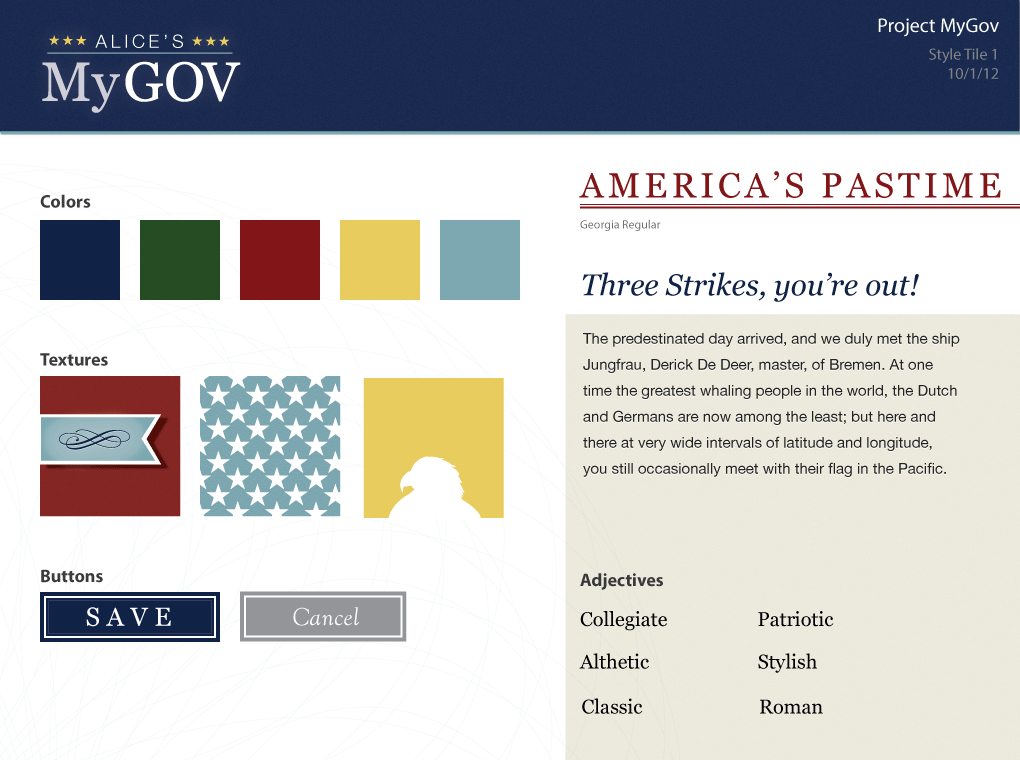
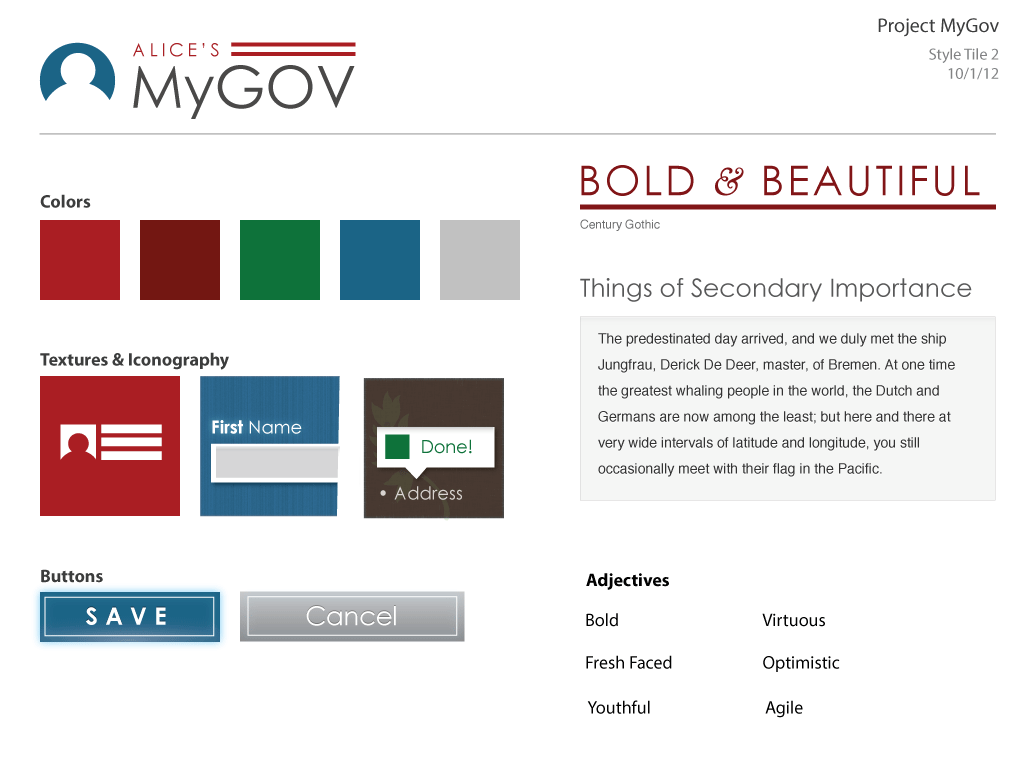
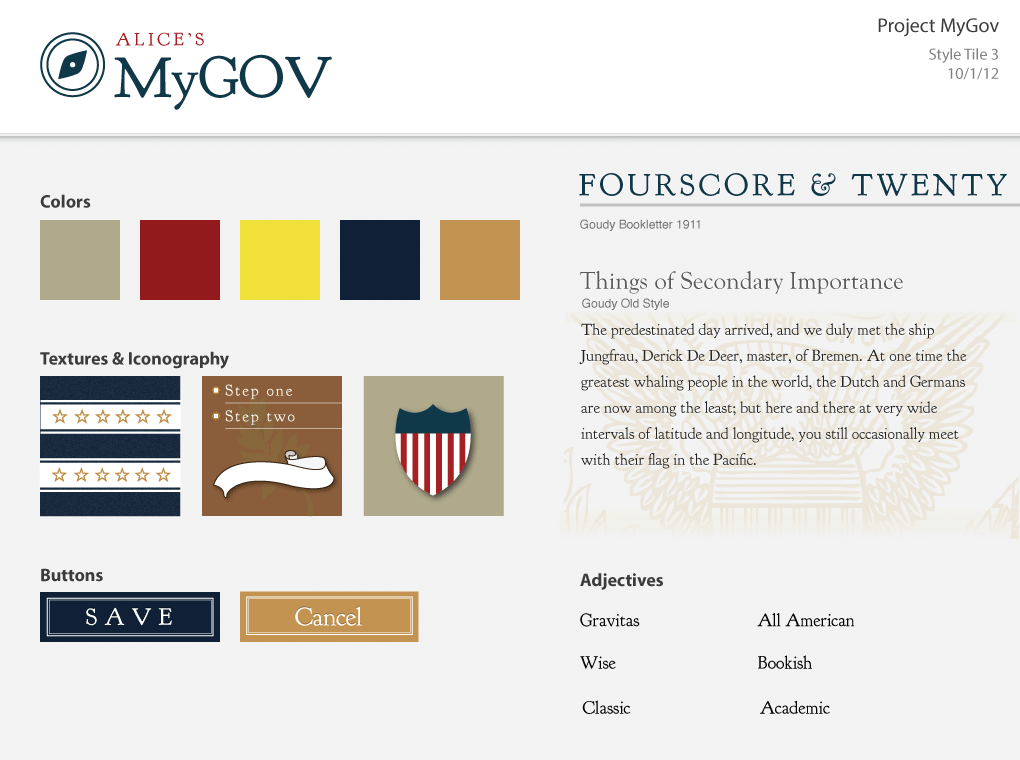
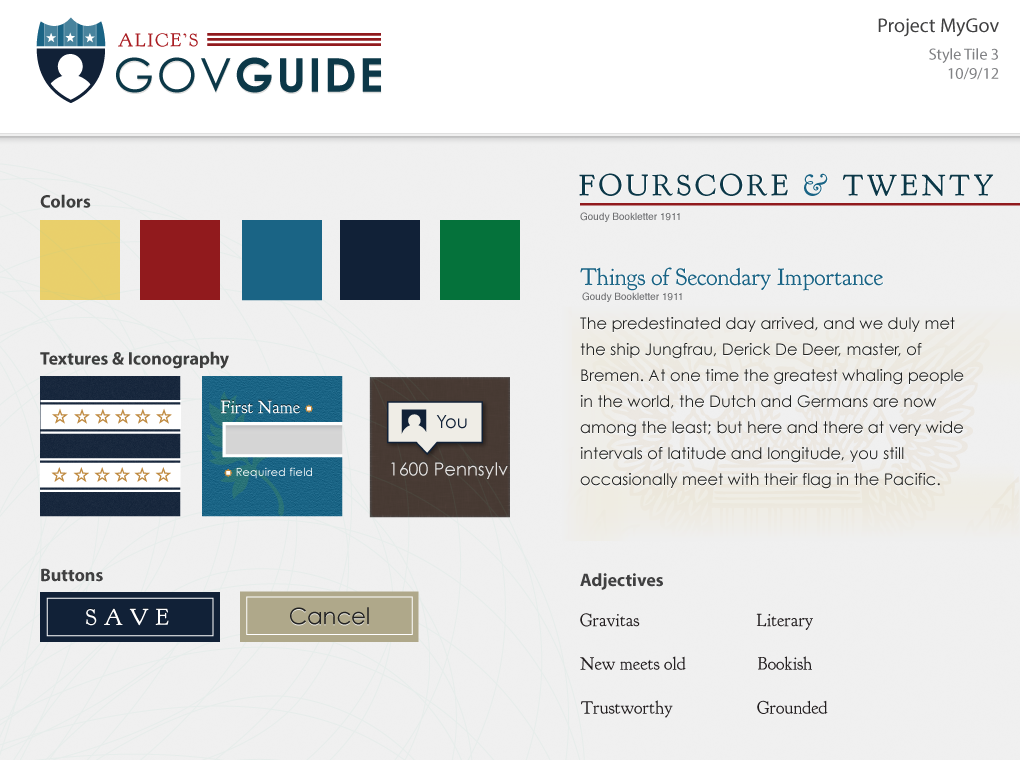
A project with a scope as big as MyGov requires lofty ideals. Invoking patriotism without partiasanship, pride without boasting, and classical ideals while appearing contemporary – all part our charge of reimagining the relationship between government and the people. To that end, we wanted to share the where the visual direction MyGov is heading. I’ve been working hard the past several weeks distilling our research at both the Library of Congress and National Archives into style tiles.

Style tiles are essentially design swatches used to create a quick visual guide for the design and development of MyGov. Rather than create a full visual design mockup in Photoshop or Illustrator, style tiles provide a roadmap for where the MyGov UI design direction. This can then be used to create design elements, or reusable building blocks, that comprise a page in the MyGov platform – especially useful given the mobile first, responsive design approach we’re bringing to MyGov. For more on style tiles, here’s the source.

These design swatch elements go beyond the traditional red, white, and blue to something patriotic, aspirational and accessible. The color palette, while still evolving, supports this by bringing in browns, parchment, and even green into the mix. For typefaces, we’re starting with Century Gothic and Goudy Bookletter - both distinctly American typefaces. This brings us full circle as Goudy Bookletter draws it’s inspiration from the typefaces I researched at the Library of Congress. The iconography introduces embellishments from print, such as bookmarks, typographic flourishes, and watermarks, to modern day web page interface elements. This complements the MyGov experience persona which we published earlier.

We’ve been incorporating many of these design elements into our product development. As always, we value your input and feedback. We’re also looking at some interesting ways we can involve the larger MyGov community in the development of the brand identity. Stay tuned.

Continue Reading →

Posted in | Tagged

Request an Invite to MyGov Beta

We’re one step closer to debuting the MyGov beta. Starting today, you can request an invite to take part in the beta. Simply follow the link below, provide your email address, and as soon as MyGov is ready for prime time we’ll let you know.

Request an invite for MyGov Beta.

###FAQs

When will the beta be released?

We plan on releasing MyGov the week of November 12th.

How will I know if I’m invited?

We plan on sending out invitations in waves. So sit tight and if you don’t hear from us by the end the November, let us know in the comments and we’ll follow up.

What’s being done with my email address?

We won’t spam you, and we won’t give it to anyone else. Promise.

What am I expected to do once the beta is released?

Once we launch the beta in November, we hope you’ll jump in, kick the tires a bit, and provide comments on the blog. We want to know what’s working for you and what we can do better. For example, “I like the logo” or “I wish MyGov would tell me when the sun’s setting in my town so I can take pictures of it and post them to Instagram.”

Continue Reading →

Posted in | Tagged

How We Created Eleanor Franklin, the MyGov Experience (UX) Persona

Robot
Humans aren’t robots. Why do we talk to them like they are? Photo: JohnGreenaway

Humans create websites for other humans to read. So when did we start talking to people like they’re robots? Raise your hand if you’ve ever seen this message on your computer screen:

“FATAL ERROR: Wrong address.”

Or some other equally horrific text. Instills confidence, right?

Changing the copy, and even the way it’s displayed, is such an easy fix, and becomes an opportunity to create a more pleasant user experience (UX). UX generally refers to how a person feels when they interact with a website or a computer program. Thinking more holistically, it can also refer to when you’re enjoying your Starbucks or riding the bus to work.

Getting back to our example above, we should avoid blaming the user whenever possible. Soften the copy, reposition the error, and present it as:

“We can’t seem to find that address. Please try entering it again.”

Said this way, the onus is on us, the creators, and doesn’t make the person using our stuff feel bad, or stupid.

One way to address this issue before someone even sees this error is to have an experience persona document in place. An experience persona informs what the UX looks, feels, and sounds like - and ensures that everyone, from engineers to editors, designers to developers, has a central place, a roadmap of sorts, to create a well-crafted interaction. It empowers everyone on the team to delight users of your product, service, or website.

Each of these things is an experience, an opportunity to delight people.

Tower of Terror Loby
Hollywood Tower of Terror lobby at Disney California Adventure. Photo: Loren Javier

Disney does a great job of creating memorable, immersive experiences. Even when you’re doing something mundane like waiting in line (or queue, as our friends across the pond would say), the attention to detail shines through. Take the Hollywood Tower of Terror, for example, a free fall attraction based on the TV show The Twilight Zone. Upon walking up to the ride, you’re instantly transported from sunny Southern California to a creepy place where something’s clearly gone wrong. From the vines crawling up the columns to the dust on the desks in the hotel lobby, they’ve thought of everything. This makes the time spent waiting in line somewhat interactive, and puts you into the right frame of mind for what you’re about to experience.

Taking that holistic view is how we approached MyGov.

The research behind the MyGov experience persona

Library of Congress
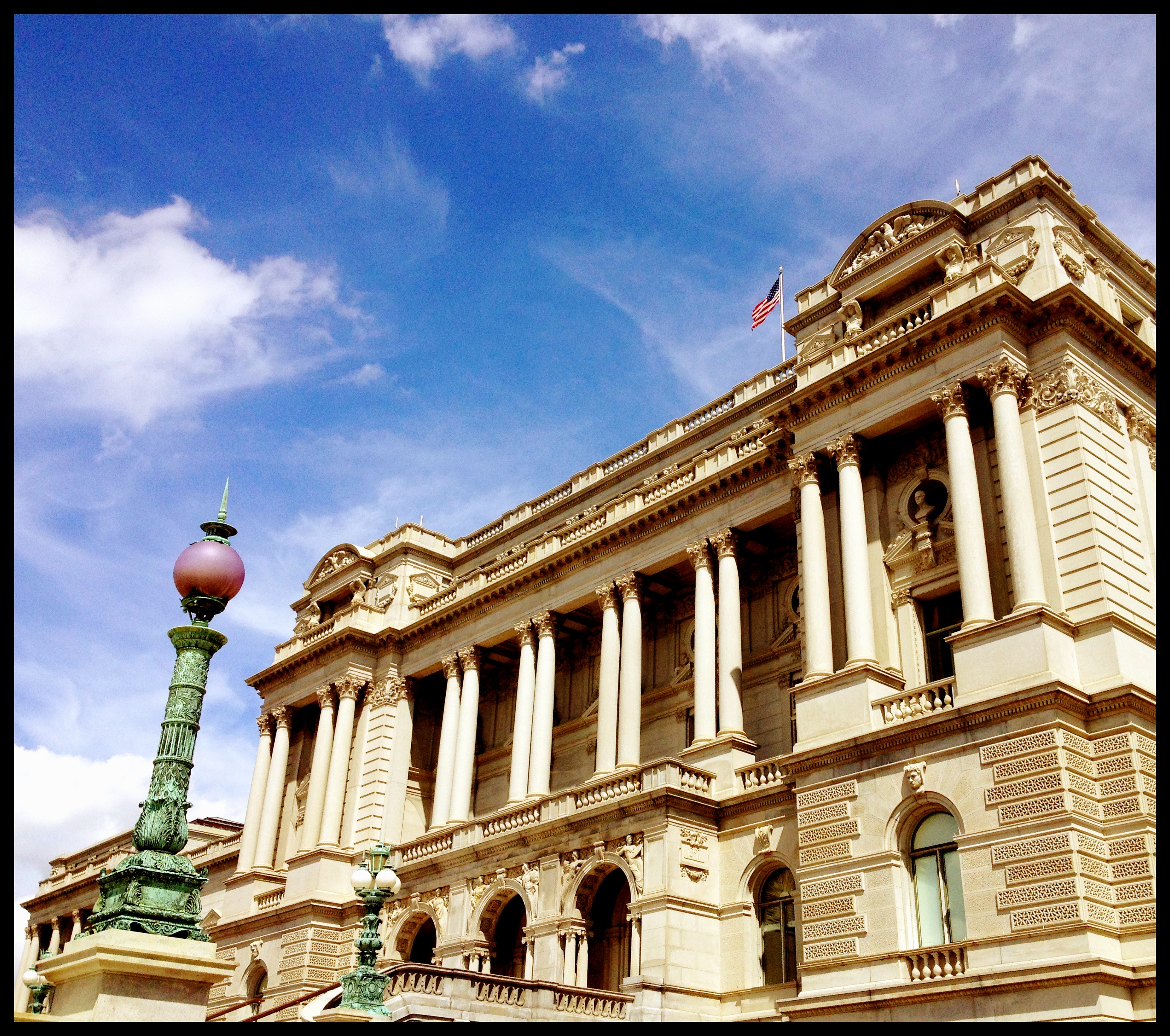
Caption: Beautiful day for research at Library of Congress. Photo: source

Project MyGov’s goal is to reimagine the relationship between the government and the people, taking what is currently an agency-focused model and making it more centered around people’s needs. We decided early on it was critical to the MyGov UX to study how the government historically communicated with people, and how people talked to the government. To that end, we conducted research at the Library of Congress and National Archives. (It also informed the MyGov design and UI.) I’ve spent time pouring over the research in order to create the experience persona.

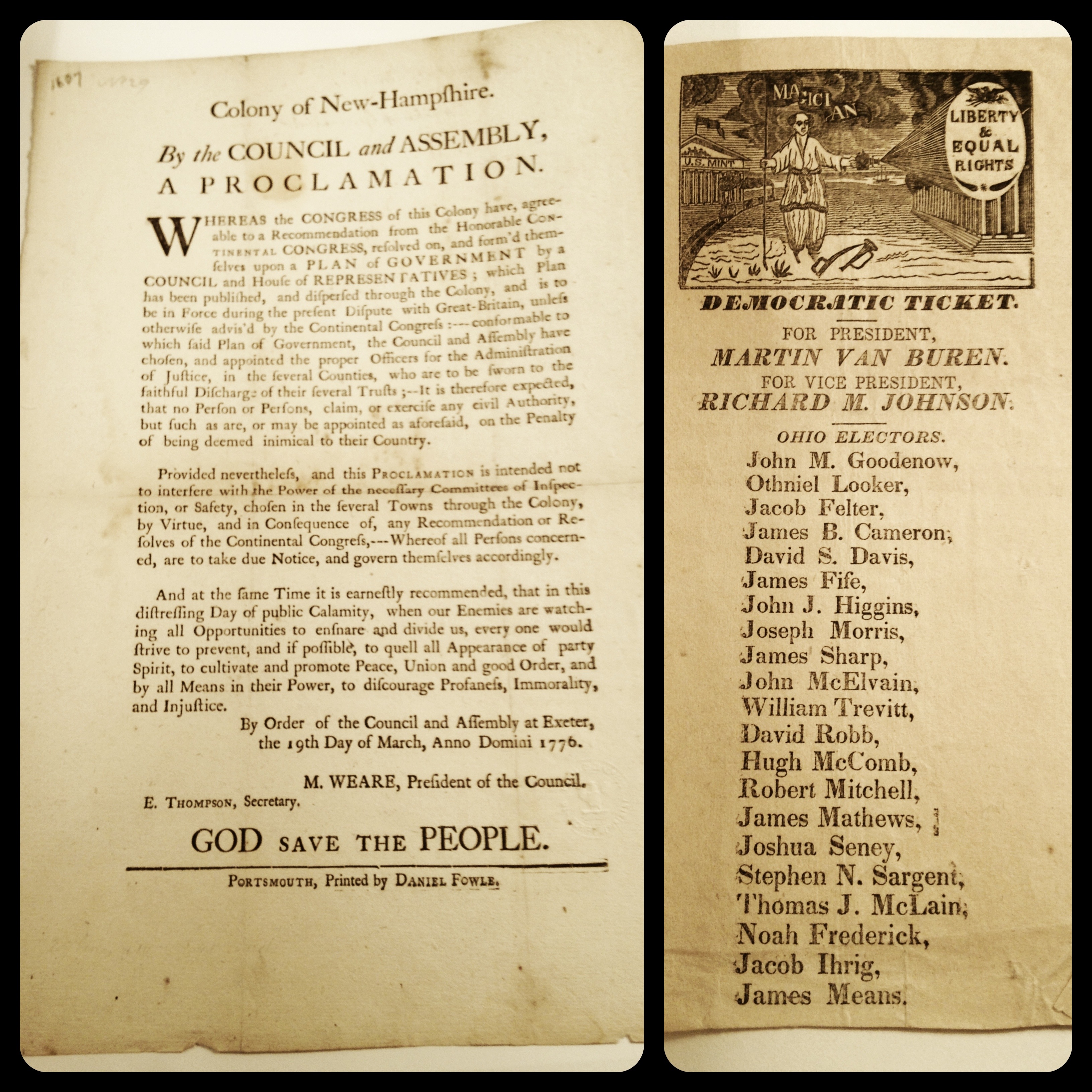
We’re grateful to Eric Frazier from Library of Congress, who took the time to carefully curate our session in the Rare Books and Special Collections Reading Room. Artifacts such as an original Democratic Party ticket and a document from the Colony of New Hampshire helped us understand how people communicated back then. We also studied the old WPA posters, created under Franklin Delano Roosevelt’s New Deal and produced between 1936 to 1943.

Bruce Bustard over at National Archives gave us a fantastic, in-depth tour of the Declaration of Independence, Constitution, and Bill of Rights. Yes, we made the obligatory National Treasure reference when we checked in on Foursquare. (And no, we didn’t do it.)

There was a bit of an a-ha moment when looking at these posters: back then, they had to get across a great deal of information in a small space. Generally less than 36 inches by 24 inches, with a large graphic and few words. It’s kind of a nice tie into today’s social communications, specifically Twitter, where you also have a small space (140 characters) to tell get your point across.

MyGov experience persona highlights

Tan Docs
An original Democratic Party ticket and Colony of New Hampshire broadsheet. Photo: source

There are six parts to an experience persona: Overview, Brand Traits, Personality Map, Voice, Visual Lexicon, and Engagement Methods. A few bits highlights called out below. (Hat tip to Aarron Walter for his design persona template - it rocks!)

Overview

Eleanor Franklin sets the tone for the MyGov experience - what it looks, feels, and sounds like. Her warm demeanor communicates trust, and her approachable nature lets people know this experience is centered around their needs. Ellie, as she’s known, always welcomes people with an easy to understand, conversational tone that calms folks during what can be times of intense change. The classic style lets people know that MyGov offers timeless experience that isn’t subject to the whims and tides of whatever’s “in” at the moment. Ellie likes to give people information that may be useful to them, and she enjoys helping them get stuff done.

We chose the name Eleanor because it’s a classic, strong name, but can be modernized by shortening it to Ellie. Franklin is a nod to Benjamin Franklin, a Founding Father and relentlessly curious soul.

Brand traits

Trustworthy and friendly rose quickly to the top of the list for us. It’s equally important, though, to have non-examples. So while the MyGov experience should come across as a fresh, it shouldn’t be trendy. Personable, but not creepy. Grounded, but not stodgy. You get the idea.

Voice

The voice of MyGov is conversational, warm, and above all talks to people in a way that you might overhear a your corner coffee shop. The voice always uses “we” and “us” to show it’s working alongside the person to complete the task. MyGov would never say something cold or robotic, and prefers “won’t” over “will not” because that’s how humans actually speak to each other. And while you won’t see MyGov getting hung up on “she/he” when a “their” sounds more conversational, watch out: the word nerd comes out when “there/their/they’re” show up in the experience.

The way we talk to people, the words we choose… they’re important. So instead of Date of Birth we’ll ask, “When were you born?” And rather than Home address there’s “Where do you live most of the time?” Because talking to someone how people really talk to one another is important.

We also consciously say person instead of citizen whenever we can, because we realize that not everyone who interacts with the government is a citizen. We also try not to use the word users…but freely admit that old habits die hard.

Final thoughts

We’re hoping MyGov helps you navigate your way around government - a sherpa, of sorts - and helps you do what you came to do. But in a friendly, Ellie-like way, and not like a robot.

View the full MyGov Experience Persona.

Continue Reading →

Posted in | Tagged

Government Forms Just Got an Upgrade

Government Form
Photo Credit: blmurch

If you’ve ever had the pleasure of filling out a TPS report or any other form (in triplicate, by hand, with a pen), have we got news for you. We’ve rolled out - and look forward to getting your feedback on - a small, open source tool to improve the experience of completing government (or other) PDF-based forms. We’ve creatively named it “PDF Filler” (seriously, hit us up in the comments with better names) and it gives web developers a standardized (RESTful in geek speak) interface that, when provided with a user’s responses and the URL to a public-facing PDF, returns the filled out PDF form. No ink smears or smudges to be found.

This is one of the fundamental deliverables we talked about as we sat down to reimagine the way citizens interact with government. We quickly realized, that at their most basic level, many people interact with government using standardized forms contained within a PDF File. In theory, PDFs are great because they preserve their paper, real-world counterpart’s original, off-line formatting. Using PDF as a file format ensures others cannot make changes to the underlying document, which is great when dealing with forms and other legal documents for which fidelity is vital.

PDF Limitations

Despite their widespread use, PDFs have some limitations, especially as we begin to look toward the future:

  1. Because such files are traditionally downloaded to a user’s desktop computer before they are viewed, they live outside the user’s web browser. This makes it hard to build new, automatically updating web-based tools to improve the user experience of completing the forms they contain.

  2. Since PDFs are digital representations of real-world paper documents, submitting PDF forms to agencies often requires printing the document itself and physically mailing it in. In a world where an increasing number of day-to-day tasks are now being completed online — from paying bills to staying in touch with classmates — such paper-based processes deserve a critical look.

  3. From a usability perspective, a PDF is constrained by many of the same limitations of paper. This brings up challenges when considering accesibility (for blind people, as an example) or user interfaces that are responsive to different mobile devices and screens of any size.

So why is this PDF Filler useful?

We envision agencies using this tool in a variety of ways:

  1. They can begin embedding existing forms within their website and other applications, rather than requiring users to download and complete the PDF offline.

  2. Because the tool is built using common standards, third-party developers can begin building apps on top of the form. One example would be a tool to aggregate and complete common fields like name and address across multiple documents.

  3. Citizens will reap the benefits by not having to fill in the same information on multiple forms – and will enjoy an improved user experience when interacting with government.

Just a First Step

PDF Filler is just one small step as part of a larger journey to reimagine people’s interactions with government. In the very near future, as government entities transition to more web-based forms to collect information, we will move to a more future-proof system of information collection where by data (the information you submit) can remain distinct from its presentation (the form itself). This will allow government agencies to provide citizen services more transparently, more conveniently, and more efficiently. In many ways tools like the PDF Filler are simply a stepping stone that can help the government better transition to end to end digital services. Fortunately we are not alone in trying to solve this problem and we see complimentary tools like SmartPDF (video) from the City of San Francisco as part of a larger toolbox.

How to help

If you’re a developer, we encourage you to “fork the repo on GitHub” and either incorporate it into your own project, or help us improve PDF Filler by taking some time to contribute.

If you’re not a developer, we’d love to hear your thoughts on the tool’s potential in the comment section below, and encourage you to be on the look out for a more evolved experience next time you interact with a government agency.

And stay tuned…we’re not finished with forms. Not by a long shot. ;)

Continue Reading →

Posted in announcements | Tagged code, pdf, forms

Live From the Bat Cave: The What and the How

Since we announced the project and introduced ourselves in August, we’ve been hard at work down in the Bat Cave (yes, we named our work space in the sub-basement here in DC). Last week we shared the results of our first usability test - thanks for all your great feedback! We’ve made a number of changes to the UI.

This week has been a busy one, as the pieces fall into place for our Project MyGov. We’ve been working on ways to deliver on reimagining how citizens interact with government – through an experience designed around their needs rather than a confusing and fragmented bureaucracy. Rather than have one large deliverable at the end of our 6 month fellowship, we’ve broken it down into 5 components (so far) and will continue to ask for your input on as we go along.

We’ve identified a number of ways the current experience can be improved:

  • Create a single account, and do away with multiple accounts across various different government websites.
  • Obliterate the need to fill out forms over and over. Do away with filling out forms by hand or having to print out and mail them in.
  • Build a more consistent experience across agency and government websites, and expose personalized content relevant to their individual needs.
  • Consolidate duplicate information that currently resides on different websites.
  • Establish the ability for people to have an ongoing relationship with their government.
  • Build APIs and hosted services that agency web teams can use to quickly integrate with MyGov.

If you think of the above as the “what” we’re going after, here’s the “how” - a set of tools and services to support these goals:

1. MyGov account

  • Provides users with a single service that can be used by agencies to sign in to any government website.

2. MyGov apps

  • Enables agencies to create a wizard for people to complete a task, transaction, or process.

3. MyGov forms service

  • Provides agencies with a service to host a form, collect data, and enable people to quickly pre-fill information from their MyGov account.

4. MyGov discovery bar

  • Provides a consistent browsing experience via a persistent navigation bar that snaps to bottom of site, which includes easy access to MyGov profile and other relevant info.
  • Embeddable widget that provides contextual information for users while browsing any government website.

More to come in the next few weeks of what this all will look and feel like.

Continue Reading →

Posted in update | Tagged

First Usability Session and Project MyGov Wireframe

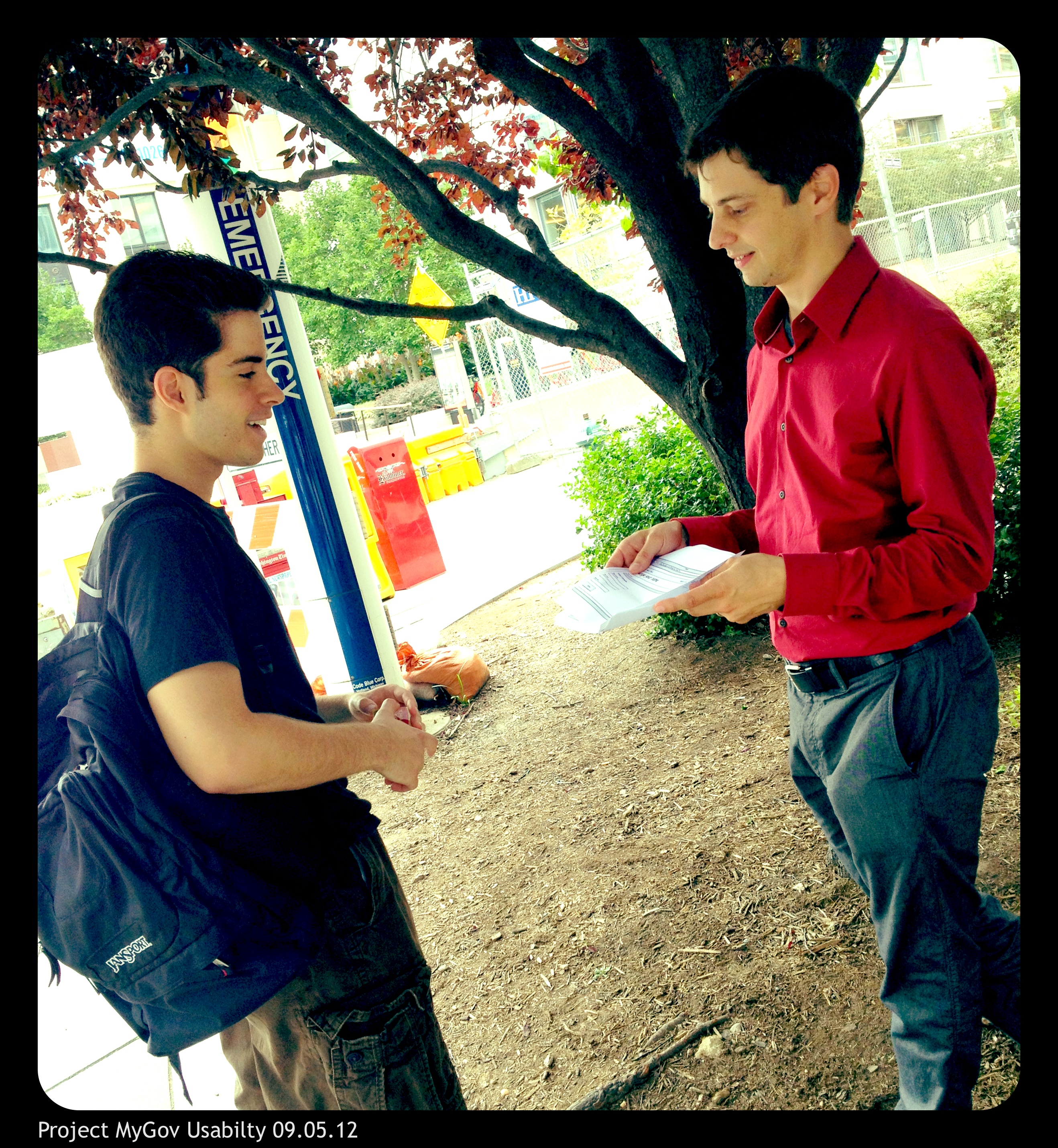
Project MyGov Usability 09.05.12{.alignright}

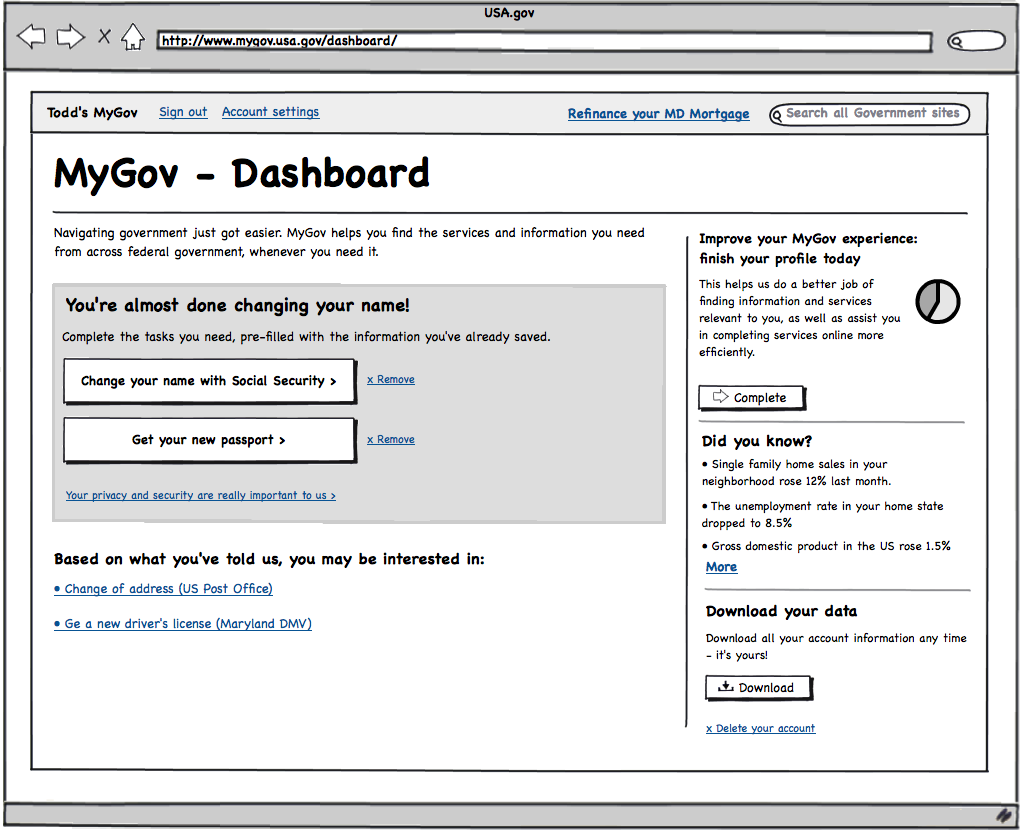
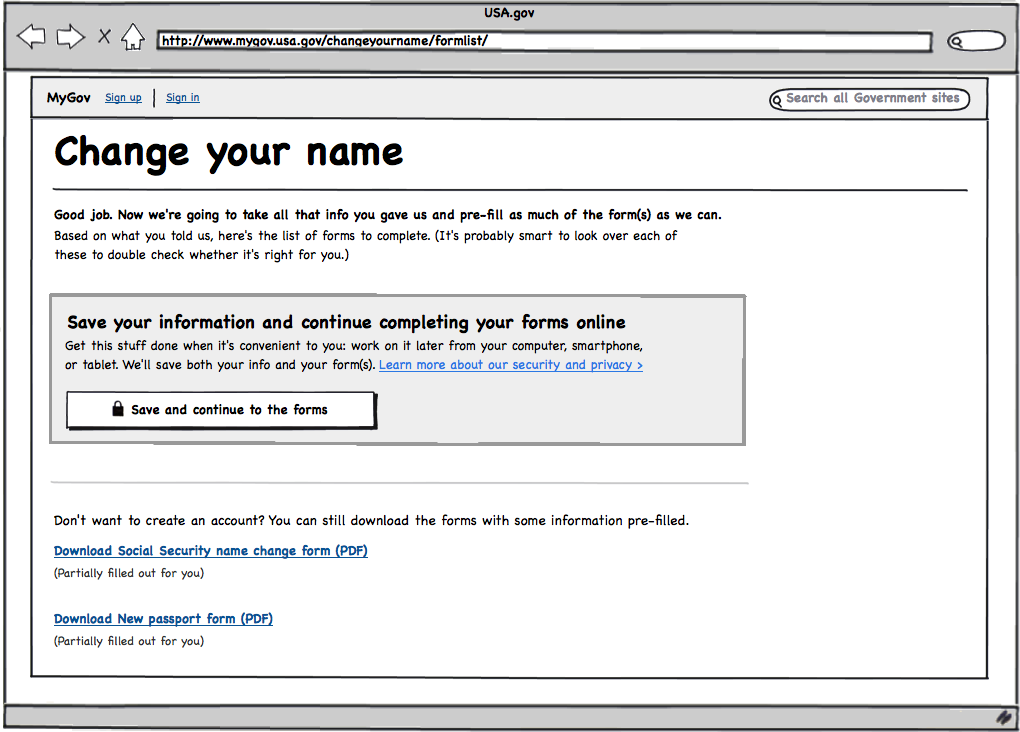
One of the ideas we’re working on with Project MyGov is reducing the burden when filling out government forms. To that end, we created a user flow for what that might look like, and spent the past two days doing some scrappy usability testing out in the wild.

  • Task: Changing your name
  • Number of participants: 10
  • Demographics: Equal mix of men and women across varying ages and races
  • Location: Outside a nearby coffee shop
  • Methodology: Paper prototype
  • Time: 5-10 minutes
  • Script: For the women, it was “Let’s say you’re getting married…” and for the men, “You were just cast in a new action movie, but when you get to Hollywood you find out a famous actor already has your name and you need to change it…”

(Cue smiles from participants.)

Here’s how we framed this task to participants:

“Introducing MyGov, your online guide to navigating government. Gone are the days of having to enter and re-enter your basic information like name and address every time you visit a government website or fill out a form. With MyGov, your information is safe and secure. Creating your account is easy, and only a few clicks away.”

We showed them a low-res wireframe, asking them to think out loud as they went through the task. To gauge the experience, we asked the same question before and after: how likely they’d be to use a service that allows them to store their personal information online if it meant it was easier to fill out forms. In between sessions we made tweaks to the experience based on patterns we saw in the feedback. Between rounds one and two, there was a 62% increase of likelihood to use the service. Sweet!

Now that we have a couple of usability sessions under our belt, we’d like to get your input.

We’re looking for your help with…

  1. How can we make the call to action stronger in this experience?
  2. What questions do you think would users have at this point?

Let us know in the comments below!

Project MyGov, 1 of 5 initiatives that are part of the new White House Presidential Innovation Fellows program, is reimagining how citizens interact with government through an experience designed around their needs rather than a confusing and fragmented bureaucracy.

Profile{.thumb} Save and Continue{.thumb} Click / tap to view full wireframe

Continue Reading →

Posted in updates | Tagged ui, ux, ui/ux, update, usability, wireframes

Project MyGov Unleashes American Ingenuity to Tackle Relationship Between People and Government

“If you always do what you’ve always done, you’ll always get what you always got.”

So let’s do something about it.

We’re the Presidential Innovation Fellows working on Project MyGov, and we’re reimagining how people interact with government—through an experience designed around their needs rather than a confusing and fragmented bureaucracy.

And that’s where you come in. But first…

What is Project MyGov?

Project MyGov is one of five initiatives of the new White House Presidential Innovation Fellows program, which pairs top innovators from the private sector, non-profits, and academia with top innovators in government to collaborate on solutions that aim to deliver significant results in six months. Each team of innovators works together in-person in Washington, DC, on focused sprints while being supported by a broader community of interested citizens throughout the country (that’d be you). What makes this initiative unique is its focus on unleashing the ingenuity and know-how of Americans from all sectors.

On Project MyGov, we’re building a personalized citizen-centric platform for accessing services, getting answers, and providing feedback.

How Can You Help?

The team kicked off Project MyGov in early August by establishing a high-level strategy and piecing together some of the system architecture and infrastructure to support it. We reviewed the feedback that came before us, such as the National Dialogue on Improving Federal Websites. We think there’s room, however, to better articulate or emphasize those ideas and hear what fresh new ones you may have.

At the core, we’re looking for ways to improve the way people and government connect at the most fundamental level and we want to hear from everyone, young and old, across the country. We also want to develop this collaboratively, so we want to hear from the civic hackers, the platform developers, the user experience gurus, the folks in technology, entertainment, design (TED, anyone?), and everyone in between.

If you’ve ever been to the post office, visited a government website, or applied for financial aid and thought, “Why did they do it this way?” or “I wish they’d thought of…” then we want to hear from you!

How to Stay Connected

Who are We?

Philip Ashlock, Benjamin J. Balter, Danny Chapman, Kara DeFrias, and Greg Gershman – the five Presidential Innovation Fellows working on Project MyGov. We’ll do formal introductions in a future post, but for now know, most importantly, we’re citizens just like you who want to reimagine a better way for government and the people to interact. Nice to meet you. Now let’s do this.

Continue Reading →

Posted in Announcements | Tagged launch, get involved